วันอาทิตย์ที่ 11 สิงหาคม พ.ศ. 2556

Knowledge of Photoshop

      Photoshop is very often the tool of choice for photo retouching, but over time it has become a widely used tool in other professional fields such asillustration, conceptual art, graphic design, web design... Therefore, it is a multi-use program that can help a lot to develop our creative work. However, it is easy for beginners to start making certain errors or time-consuming methodology through using the tools incorrectly.
        Whether you are new to Photoshop or if you have been using it for years, take a look at this article to learn some of the tips that will extend your basic knowledge of Photoshop and how you work with it.
10 Photoshop Tips: Extend Your Basic Knowledge of Photoshop

Extend Your Basic Knowledge of Photoshop

1. Work with separated and well organized layers. It’s the best way to always be able to make any changes to your projects.
Separated, well organized layers
2. Use adjustment layers instead of aplying adjustments directly. You’ll be able to delete adjustments, apply them to other layers, change them at any moment. Just take profit of them!
Adjustment layers
3. Working non-destructively is the best way to work. Adjustment layers, masks, using retouching tools by checkingSample All Layers, that’s the way to work without having to worry about making mistakes.
Sample all layers
Using masks
4. About using brushes, forget about going to the brush options to change size and softness, you’ll waste time and will never get the precise size you need. In Mac just hold Ctrl and Alt, and drag horizontal for size, vertical for softness. In Windows hold Alt and right click and drag the same way. A preview of the actual size and sharpness will show in red, faster and much more precise.
Brush size and softness
5. When using the crop tool always uncheck Delete Cropped Pixels. Apart from a new option to work non-destructively, it lets you keep all that you can’t see in the image but it will hidden outside the edges. After finishing the project check this option again and crop the image to it’s final size, you’ll reduce the archive disk space used.
Uncheck Delete Cropped Pixels
Using the Crop Tool
6. The best way to obtain a good selection is by combining different selection tools and adjusting them. I recommend to first select quickly with a simple selection tool like lasso, or magic wand and refine it with the Refine edge option.
Refine Edge
7. When working with masks always remember it’s not necessary to feather the edge, you can go to masks properties and quickly adjust the sharpness or softness, and you always have the option to go back to the original mask.
Mask Properties
8. Learn from others. There are incredible artists out there, follow them, look at their portfolios, watch their tutorials and personal techniques and experiment with them. You’ll not only be inspired, you’ll explore and learn, and the result is the improvement of your style.
9. Forget the mouse, use a tablet! No matter if you are an illustrator, designer, retoucher... definitively use a tablet. You’ll work faster, much more intuitively and accurately and will take advantage of working with pressure, inclination and rotation (especially when working with brushes) and the most important thing: your hand will appreciate it!
Tablet
10. Invest time in sketching! It’s important to have a well defined idea of the project you’re going to work on so you don’t lose time making proofs. Make a good sketch including all your ideas, colours, everything and you’ll get to the final image quickly without getting lost!
Sketching
Restul

SOME GENERAL TIPS FOR SPECIFIC AREAS

1. In illustration, matte painting, concept art... it is better to start with a 50% grey background. The reason is simple, in terms of light and shadow, when you start with a white background your scene is 100% light, so it will be difficult to contrast correctly with midtones and shadows. Start with a 50% grey background add basic colours and shapes and you’ll be able to add lights and shadows more naturally.
2. In graphic and web design, take advantage of the infinite possibilities of using styles. A simple layer, shape or text can look awesome with a few style effects and these can be saved to be applied in different layers.
3. In typography art, I would say that the new Photoshop CS6 3D text manipulation options should be your ally, it has been improved drastically so you can do anything you can imagine with a few clicks. Just give it a try!
4. In painting, use brushes but not all brushes! The best way to work with them is by using similar techniques, so your projects will look consistent. If you use too many different brushes, in an illustration for example, it will loose strengh and coherence.

Conclusion

So, the most important thing to start working with Photoshop is that we get used to using a style of work that maximizes the options non-destructively, so that we will always be able to make changes to our projects and will ensure that nothing is lost in the process.
If you are a beginner or a veteran Photoshop user, my recommendation is that you integrate these tips into your working method and you will soon see the results: you will be able to do the same work in less time, and with better editing speed.
To know how to use Photoshop isn't everything, it is important to know how to use it correctly!

Protection From Memory Errors

PROTECTION FROM MEMORY ERRORS
       
        Some random access memory (RAM) chips have built-in error-checking functions that use a process called parity. Chips that use parity have an extra bit for every eight bits of data. In the parity process, as the eight bits receive binary data (data represented by 1s and 0s), the chip adds all the 1s, and if that total is odd, the extra bit is set to 1. If the total is even, the extra bit is set to 0. When the computer tries to read each byte of data back from the RAM, it calculates the total number of 1s again and compares its findings to the parity bit. If the findings match up, the data is ruled error-free and can be sent to the CPU. If the findings don't match up, the chip assumes the data is erroneous and dumps it. This is called even parity. Odd parity is the same process, except that the extra bit setting is 1 when the sum of all the 1s in the byte is even.
      The computer checks a bit for parity each time a byte is transferred or transmitted. The process of parity uses simple arithmetic to determine whether stored data values are the same when they are read as they were when they were written. This is fine for detecting errors, but it doesn't do anything to correct them. If parity proves data to be faulty, the memory system simply rejects the data and starts over.
      High-end computer servers need a more effective form of error-checking, such as error-correcting code (ECC). ECC uses more memory than parity, but with its special algorithm, it can actually fix most errors it finds. Amazingly, many computers operate with nonparty memory and manage to continue working despite lacking this check. The good news is that memory components used in PCs today have improved and checking the integrity of memory and data is less necessary than it once was for the average home computer

History Of Computer

What is a Computer?

History of The Computer     In its most basic form a computer is any device which aids humans in performing various kinds of computations or calculations. In that respect the earliest computer was the abacus, used to perform basic arithmetic operations.
     Every computer supports some form of input, processing, and output. This is less obvious on a primitive device such as the abacus where input, output and processing are simply the act of moving the pebbles into new positions, seeing the changed positions, and counting. Regardless, this is what computing is all about, in a nutshell. We input information, the computer processes it according to its basic logic or the program currently running, and outputs the results.
     Modern computers do this electronically, which enables them to perform a vastly greater number of calculations or computations in less time. Despite the fact that we currently use computers to process images, sound, text and other non-numerical forms of data, all of it depends on nothing more than basic numerical calculations. Graphics, sound etc. are merely abstractions of the numbers being crunched within the machine; in digital computers these are the ones and zeros, representing electrical on and off states, and endless combinations of those. In other words every image, every sound, and every word have a corresponding binary code.
      While abacus may have technically been the first computer most people today associate       the word “computer” with electronic computers which were invented in the last century, and have evolved into modern computers we know of today.
History of The Computer
ENIAC

First Generation Computers            (1940s – 1950s)

      First electronic computers used vacuum tubes, and they were huge and complex. The first general purpose electronic computer was the ENIAC (Electronic Numerical Integrator And Computer). It was digital, although it didn’t operate with binary code, and was  reprogrammable to solve a complete range of computing problems. It was programmed using plugboards and switches, supporting input from an IBM card reader, and output to an IBM card punch. It took up 167 square meters, weighed 27 tons, and consuming 150 kilowatts of power. It used thousands of vacuum tubes, crystal diodes, relays, resistors, and capacitors.
     The first non-general purpose computer was ABC (Atanasoff–Berry Computer), and other similar computers of this era included german Z3, ten British Colossus computers, LEO, Harvard Mark I, and UNIVAC.
History of The Computer
IBM 1401

Second Generation Computers (1955 – 1960)

     The second generation of computers came about thanks to the invention of the transistor, which then started replacing vacuum tubes in computer design. Transistor computers consumed far less power, produced far less heat, and were much smaller compared to the first generation, albeit still big by today’s standards.
     The first transistor computer was created at the University of Manchester in 1953. The most popular of transistor computers was IBM 1401. IBM also created the first disk drive in 1956, the IBM 350 RAMAC.

Third Generation Computers (1960s)

History of The Computer
IBM System/360
     The invention of the integrated circuits (ICs), also known as microchips, paved the way for computers as we know them today. Making circuits out of single pieces of silicon, which is a semiconductor, allowed them to be much smaller and more practical to produce. This also started the ongoing process of integrating an ever larger number of transistors onto a single microchip. During the sixties microchips started making their way into computers, but the process was gradual, and second generation of computers still held on.
      First appeared minicomputers, first of which were still based on non-microchip transistors, and later versions of which were hybrids, being based on both transistors and microchips, such as IBM’s System/360. They were much smaller, and cheaper than first and second generation of computers, also known as mainframes. Minicomputers can be seen as a bridge between mainframes and microcomputers, which came later as the proliferation of microchips in computers grew.

Fourth Generation Computers (1971 – present)

     First microchips-based central processing units consisted of multiple microchips for different CPU components. The drive for ever greater integration and miniaturization led towards single-chip CPUs, where all of the necessary CPU components were put onto a single microchip, called a microprocessor. The first single-chip CPU, or a microprocessor, was Intel 4004.
     The advent of the microprocessor spawned the evolution of the microcomputers, the kind that would eventually become personal computers that we are familiar with today.

           First Generation of Microcomputers (1971 – 1976)

History of The Computer
Altair 8800
      First microcomputers were a weird bunch. They often came in kits, and many were essentially just boxes with lights and switches, usable only to engineers and hobbyists whom could understand binary code. Some, however, did come with a keyboard and/or a monitor, bearing somewhat more resemblance to modern computers.
      It is arguable which of the early microcomputers could be called a first. CTC Datapoint 2200 is one candidate, although it actually didn’t contain a microprocessor (being based on a multi-chip CPU design instead), and wasn’t meant to be a standalone computer, but merely a terminal for the mainframes.               The reason some might consider it a first microcomputer is because it could be used as a de-facto standalone computer, it was small enough, and its multi-chip CPU architecture actually became a basis for the x86 architecture later used in IBM PC and its descendants. Plus, it even came with a keyboard and a monitor, an exception in those days.
      However, if we are looking for the first microcomputer that came with a proper microprocessor, was meant to be a standalone computer, and didn’t come as a kit then it would be Micral N, which used Intel 8008 microprocessor.
      Popular early microcomputers which did come in kits include MOS Technology KIM-1, Altair 8800, and Apple I. Altair 8800 in particular spawned a large following among the hobbyists, and is considered the spark that started the microcomputer revolution, as these hobbyists went on to found companies centered around personal computing, such as Microsoft, and Apple.

           Second Generation Microcomputers (1977 – present)

History of The Computer
Commodore PET2001 (Image by Tomislav Medaklicensed under CC-BY-SA).
       As microcomputers continued to evolve they became easier to operate, making them accessible to a larger audience. They typically came with a keyboard and a monitor, or could be easily connected to a TV, and they supported visual representation of t  ext and numbers on the screen.
        In other words, lights and switches were replaced by screens and keyboards, and the necessity to understand binary code was diminished as they increasingly came with programs that could be used by issuing more easily understandable commands. Famous early examples of such computers include Commodore PET, Apple II, and in the 80s the IBM PC.
      The nature of the underlying electronic components didn’t change between these computers and  modern computers we know of today, but what did change was the number of circuits that could be put onto a single microchip. Intel’s co-founder Gordon Moore predicted the doubling of the number of transistor on a single chip every two years, which became known as “Moore’s Law”, and this trend has roughly held for over 30 years thanks to advancing manufacturing processes and microprocessor designs.
      The consequence was a predictable exponential increase in processing power that could be put into a smaller package, which had a direct effect on the possible form factors as well as applications of modern computers, which is what most of the forthcoming paradigm shifting innovations in computing were about.

            Graphical User Interface (GUI)

History of The Computer
Macintosh 128k (Image by All About Apple museum licensed under CC-BY-SA-2.5-it)
      Possibly the most significant of those shifts was the invention of the graphical user interface, and the mouse as a way of controlling it. Doug Engelbart and his team at the Stanford Research Lab developed the first mouse, and a graphical user interface, demonstrated in 1968. They were just a few years short of the beginning of the personal computer revolution sparked by the Altair 8800 so their idea didn’t take hold.
      Instead it was picked up and improved upon by researchers at the Xerox PARC research center, which in 1973 developed Xerox Alto, the first computer with a mouse-driven GUI. It never became a commercial product, however, as Xerox management wasn’t ready to dive into the computer market and didn’t see the potential of what they had early enough.
      It took Steve Jobs negotiating a stocks deal with Xerox in exchange for a tour of their research center to finally bring the user friendly graphical user interface, as well as the mouse, to the masses. Steve Jobs was shown what Xerox PARC team had developed, and directed Apple to improve upon it. In 1984 Apple introduced the Macintosh, the first mass-market computer with a graphical user interface and a mouse.
      Microsoft later caught on and produced Windows, and the historic competition between the two companies started, resulting in improvements to the graphical user interface to this day.
       Meanwhile IBM was dominating the PC market with their IBM PC, and Microsoft was riding on their coat tails by being the one to produce and sell the operating system for the IBM PC known as “DOS” or “Disk Operating System”. Macintosh, with its graphical user interface, was meant to dislodge IBM’s dominance, but Microsoft made this more difficult with their PC-compatible Windows operating system with its own GUI.

            Portable Computers

History of The Computer
Powerbook 150 (Image by Dana Sibera licensed under CC-BY-SA.)
       As it turned out the idea of a laptop-like portable computer existed even before it was possible to create one, and it was developed at Xerox PARC by Alan Kay whom called it the Dynabook and intended it for children. The first portable computer that was created was the Xerox Notetaker, but only 10 were produced.
         The first laptop that was commercialized was Osborne 1 in 1981, with a small 5″ CRT monitor and a keyboard that sits inside of the lid when closed. It ran CP/M (the OS that Microsoft bought and based DOS on). Later portable computers included Bondwell 2 released in 1985, also running CP/M, which was among the first with a hinge-mounted LCD display. Compaq Portable was the first IBM PC compatible computer, and it ran MS-DOS, but was less portable than Bondwell 2. Other examples of early portable computers included Epson HX-20, GRiD compass, Dulmont Magnum, Kyotronic 85, Commodore SX-64, IBM PC Convertible, Toshiba T1100, T1000, and T1200 etc.
         The first portable computers which resemble modern laptops in features were Apple’s Powerbooks, which first introduced a built-in trackball, and later a trackpad and optional color LCD screens. IBM’s ThinkPad was largely inspired by Powerbook’s design, and the evolution of the two led to laptops and notebook computers as we know them. Powerbooks were eventually replaced by modern MacBook Pro’s.
         Of course, much of the evolution of portable computers was enabled by the evolution of microprocessors, LCD displays, battery technology and so on. This evolution ultimately allowed computers even smaller and more portable than laptops, such as PDAs, tablets, and smartphones.

วันเสาร์ที่ 27 กรกฎาคม พ.ศ. 2556

Data Center Facebook

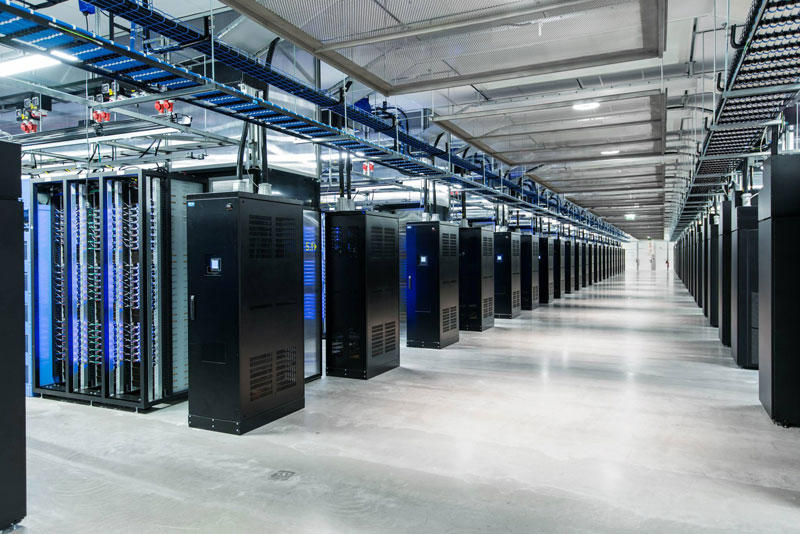
      Facebook is seeking an expert facility operations engineer to join our data center operations team. Our data centers serve as the foundation upon which our software operates to meet the demands of our customers. The suitable candidate will work with the management team to facilitate operating and maintaining the data center. The candidate will need to be experienced in diverse industries such as electrical generation, electrical distribution, cooling technologies and fire suppression systems.build a world-class facility in our new Data Center in Lulea, Sweden. This role will be based in Dublin, Ireland.
          
FBDataCenter01 Центр обработки данных Facebook возле Полярного круга
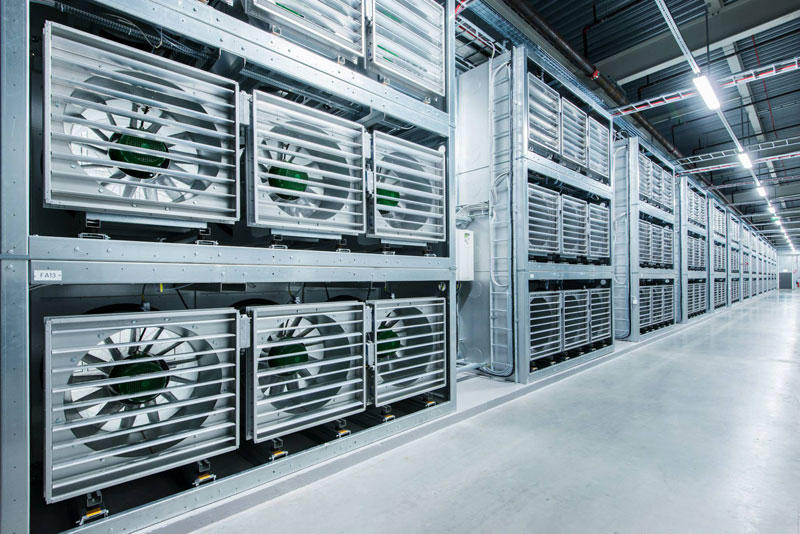
      There are the many of HDD. Prepare to        a large server.Facebook Guide believe that Lulea is likely to be one of the most efficient and sustainable data centers in the world. There are a fan for colling down the server by get the cold air from outside come and gone.All the equipment in the center provides electricity to the local hydroelectric power plant that runs on renewable energy, thus reducing the number of backup generators for more  than70%.  
FBDataCenter12 Центр обработки данных Facebook возле Полярного круга      In addition to the energy of the water,the center is also used by the northern cold air to cool the servers that store photos, videos,  comments and "likes." Any excess heat is used to maintain a comfortable temperature in offices. Almost all of the technology at the center, from servers to power distribution systems, based on the work of Open Compute Project - community of engineers from around the world, which is engaged in designing storage centers. The ventilators can never work in the cold season. Because they will use the cold weather coming in and going out to travelling the hot tempurator from database to outside.

Data Center Google

          The Google Modular Data Center is a set of shipping containers used by Google to house its servers. They were revealed on April 1, 2009, during the first Google Data Center Efficiency Summit in Mountain View, California. The data centers are rumored to cost $600 million USD each, and use from 50 to 103 megawatts of electricity. They house the computing resources that comprise the Google platform.
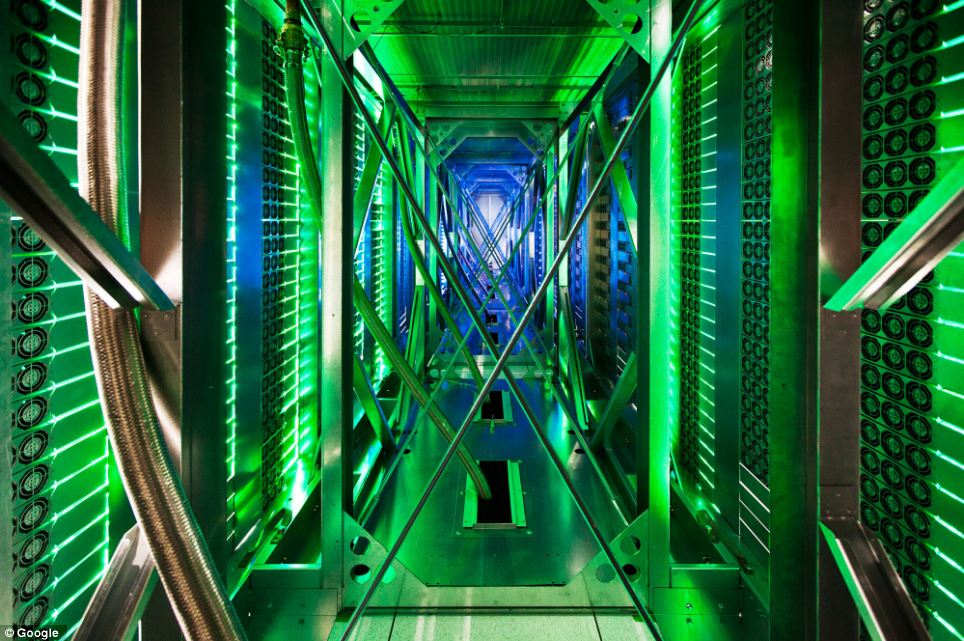
Inside the internet 5 Дата центры Google 
                                                                                   
      Google was reported in November 2005 to be working on their own shipping container datacenter. Although in January 2007 it was reported that the project had been discontinued, Google's patent on the concept was still pushed through the patent system and was successfully issued in October 2007. In 2009 Google announced that their first container based data center  has been in production since 2005.                                                                                    
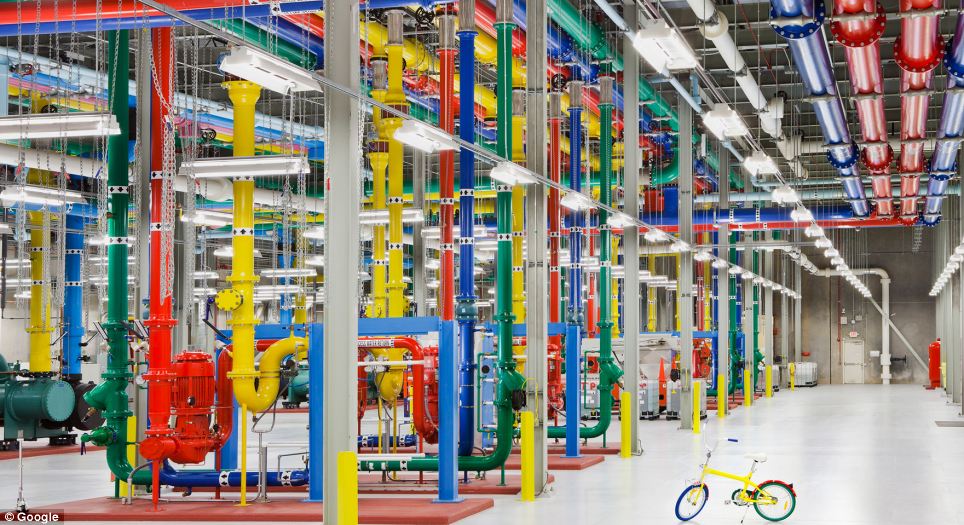
Inside the internet 7 Дата центры Google
       Google has provided us with a rare opportunity to see their data centers around the world, thanks to which every day we can use the services of this global Internet company. This is a real maze of servers that handle online queries into a search engine, show us a video on YouTube, and deliver emails to millions         of people. Hundreds of thousands of servers, colorful cables and even bicycles to move the employees of the centers - in this collection you will find and data centers in the former paper mill in Finland, and specially designed server centers in Iowa, USA.  

Computer Network

"Computer networks" redirects here. For the periodical, see Computer Networks (journal).   
"Datacom" redirects here. For other uses, see Datacom (disambiguation).
         A computer network (or data network) is a telecommunications network that allows computers to exchange data. The physical connection between networked computing devices is established using either cable media or wireless media. The best-known computer network is the Internet.
     Network devices that originate, route and terminate the data are called network nodes. Nodes can include hosts such as servers and personal computers, as well as networking hardware. Two devices are said to be networked when a process in one device is able to exchange information with a process in another device.
      Computer networks support applications such as access to the World Wide Web, shared use of application and storage serversprinters, and fax machines, and use of email and instant messaging applications. The remainder of this article discusses local area network technologies and classifies them according to the following characteristics: the physical media used to transmit signals, the communications protocols used to organize network traffic, along with the network's size, its topology and its organizational intent.

Home network

          home network or home area network (HAN) is a residential local area network (LAN)   for communication between digital devices typically deployed in the home, usually a small number of personal computers and accessories, such as printers and mobile computing devices. An important function is the sharing of Internet access, often a broadband service provisioned by fiber-to-the-home or via Cable Internet access, Digital Subscriber Line (DSL) or mobile broadband by Internet service providers (ISPs). If an ISP only provides one IP address, a router including network address translation (NAT), proxy server software and typically a network firewall, allows several computers to share the external IP address. The router function may be assumed by a PC with several network interfaces, but a dedicated router device is more common, often including a wireless accesspoint, providing WiFi access.